

It may not make sense for you to apply to Beckham’s Law. Only after a certain amount of earnings, you see the benefit. To check if it’s worth it in your case, you can use our Beckham’s Law Calcualator.
It’s worth noting that getting Beckham’s Law will remove the right for you to claim any family tax deductions while. So if you’re a family you may want to check what are the deductions you’d be elegible for and decide which one is more worth it for your situation.
If you decide that this tax application would be beneficial for you, you’ll also need to check that you meet the requirements before you apply. To apply to this law, you need to meet all the following:
✅ You have recently become a tax resident as a result of the move
✅ You have not been a tax resident in Spain in the last 5 years
✅ You apply for the tax law within the first 6 months of commencing your work in Spain
✅ You have moved to Spain for work, in one of the following circumstances
During your application you will need to submit a number of documents. You should prepare them in a folder in your laptop, in PDF and named in Spanish as indicated below:
When you’re ready to start your application, go to this website and follow the below steps:
1. Click on “Modelo 149. Aportar documentación necesaria para optar por el régimen especial” to get started.
2. Login with Cl@ve to access the form - You can scan the QR Code with Cl@ve Movil for easy access
3. When you’re inside, you will be taken to a page where you need to add your personal details and you can attach all the documents. Please attach a PDF copy of all the following:
You will need to add a Subject for the submission in "Asunto" - Here you can add your name and passport number followed by "Documentación necesaria para optar por el regimen especial" to help the tax agency easily locate your files.
To upload your documents, you can select "200 - Otros documentos" from the dropdown and click on "Añadir ficheros". You will also need to add your phone number and email address twice, to confirm your contact details.
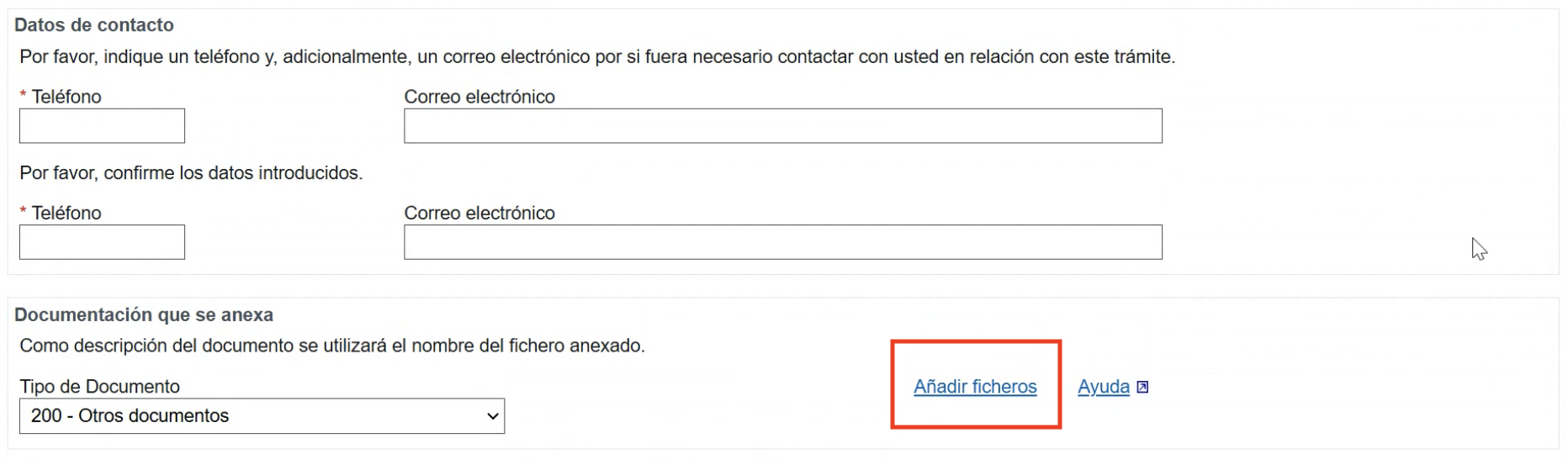
4. Submit your documents by clicking on "Firmar y Enviar", and you will be provided with a confirmation document - Save it, this is your proof that you submitted the documentation
5. There will be a “Nº registro” in the confirmation document. This is an ID you will need in the next step - Copy the ID and keep it in hand.
When you’re ready to start your application, go back to this website and follow the below steps:
1. Click on “Modelo 149. Presentación” to get started.
2. When you’re inside, fill in the “Contribuyente” section with your personal details
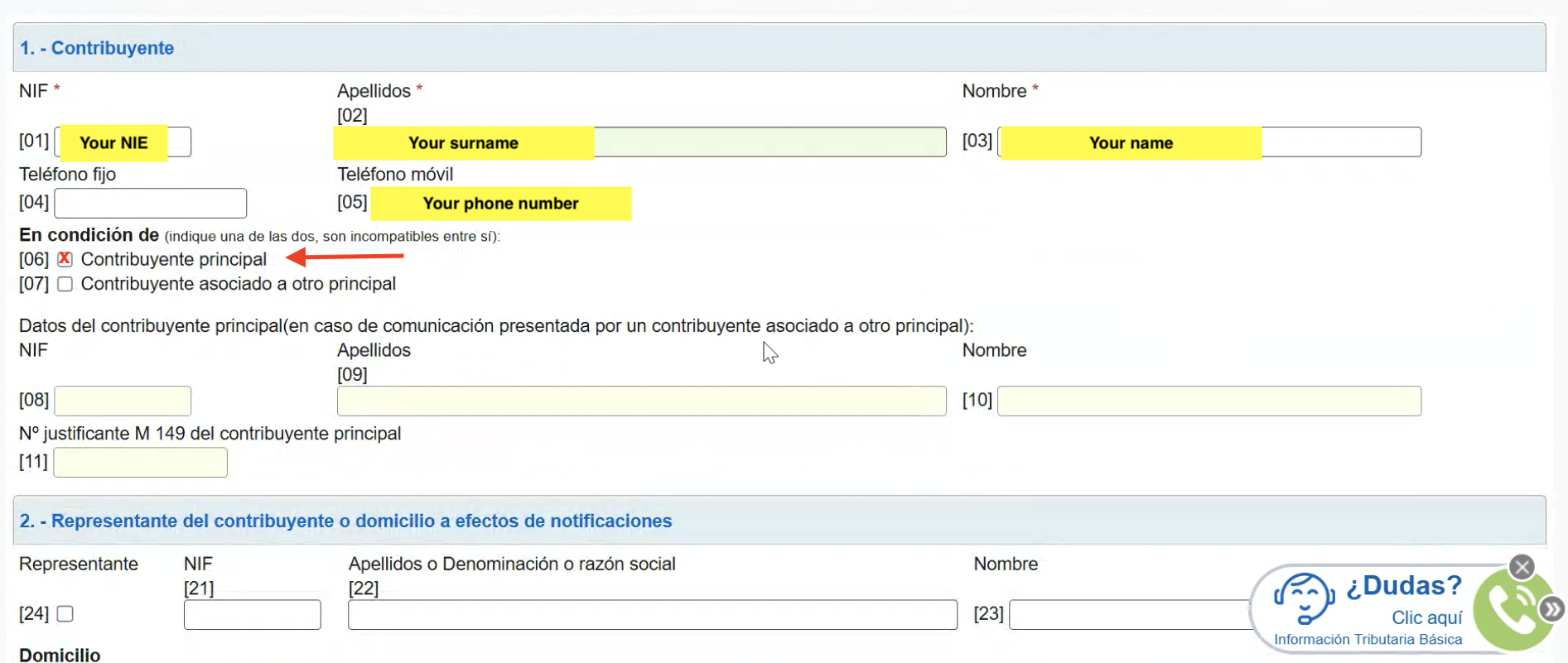
Generally the next few fields can be left empty unless you're applying on someone else's behalf.
3. In the section “Domicilio a efecto de notificaciones” add your Spanish home address details. This is where you will receive any Tax notifications:
4. Mark with an cross (X) “Opción por el régimen” [31] to indicate you are opting in to this tax benefit. The rest of the fields in this section are to opt out.
5. In “Nº registro de la documentación” [32]: you will add the reference number you got in the previous step when you submitted the required documents
6. Fill section 4A that applies to the reason you moved. Fill in the details of your selected reason as following:
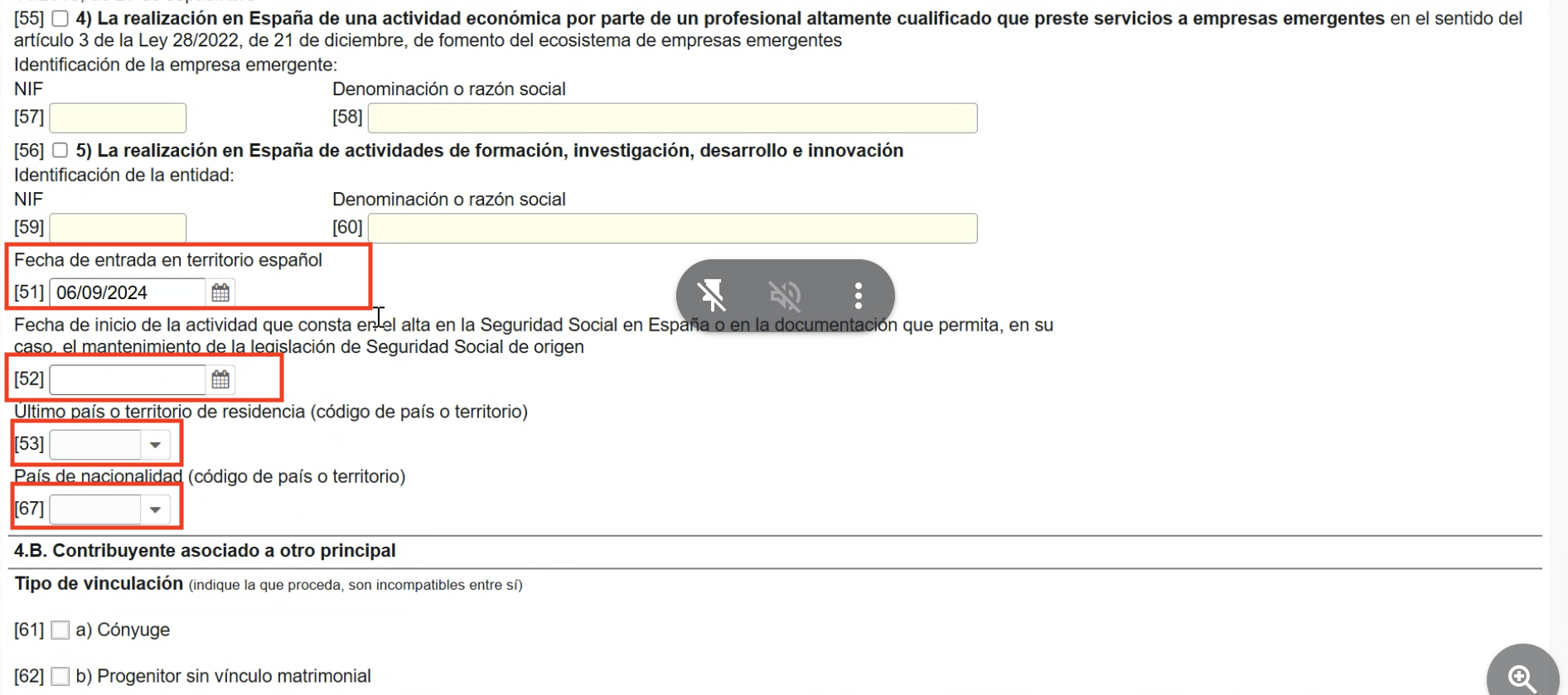
7. In field [51] select the date in which you entered Spain.
8. In field [52] select the date in which you started your work in Spain (this date should match with what is in your social security registration)
9. In field [53] select the country code in which you were residing previous to Spain
10. In field [67] select the country code of your nationality
11. At the bottom of the form you can click on the button with the green tick that says "Validar Declaración" and the system will check if your form has any errors or fields missing. If it returns "No existen errores". It means that all is good with your form and you can submit it.
12. Submit the form by clicking on "Firmar y Enviar" and follow the steps to accept the terms and complete submission.

Congrats! 🥳 You have applied for Beckham’s Law. Make sure to save the PDF confirmation as proof of your submission.
You will need to wait to receive a decision on your approval from the Governement. Normally this takes a couple of weeks, but can take up to 2 months if they experience issues with your application or there’s delays in the office.
Keep an eye on your Cl@ve Account for notifications.
Keep an eye on your Cl@ve Account, and you will receive a notification when you’re application has been approved. Click on it, and you’ll be able to download your Tax Benefit Certificate. You can then send this to your company’s payroll team, and they will be able to use that to apply the new tax rate onto your earnings.You’re done with Beckham’s Law! Well done 👏
